

Minecraft 1.21.44 is a small Bedrock Edition hotfix released on November 1, 2024. Instead of adding new mobs, blocks, or biomes, Mojang released this version to fix a Skull block problem affecting older world templates and a crash involving Realms Stories.
The update retains the major features introduced in Minecraft 1.21.40, including Bundles and Hardcore Mode. Players can find more Android releases at Minecraft APK or browse the Minecraft category.
What’s New in Minecraft 1.21.44?
Minecraft 1.21.44 contains only a small number of fixes. It was released specifically to address issues discovered after Minecraft 1.21.40.
Skull Block Fix
Minecraft 1.21.40 separated the old Skull block into individual block types such as:
- Skeleton Skull
- Wither Skeleton Skull
- Zombie Head
- Player Head
- Creeper Head
- Dragon Head
- Piglin Head
A compatibility problem could cause different Skull variants to become skeleton_skull when opening a world template locked to a version earlier than 1.21.40.
Minecraft 1.21.44 fixes this conversion problem.
However, Mojang notes that the update does not restore chunks that were already overwritten, so keeping backups of older worlds remains important.
Realms Stories Crash Fix
Minecraft 1.21.44 also fixes a crash affecting Realms on several platforms.
The crash could occur when a player:
- Opened the Realm member-management screen.
- Invited another player.
- Navigated back to Realms Stories.
The hotfix corrects this problem and makes Realm member management more stable.
Does Minecraft 1.21.44 Add New Features?
No.
Minecraft 1.21.44 is a maintenance hotfix, not a major content update.
It does not introduce new:
- Mobs
- Biomes
- Weapons
- Structures
- Blocks
- Game modes
The main gameplay features available in this release come from the earlier Minecraft 1.21.40 Bundles of Bravery update.
Bundles in Minecraft 1.21.44
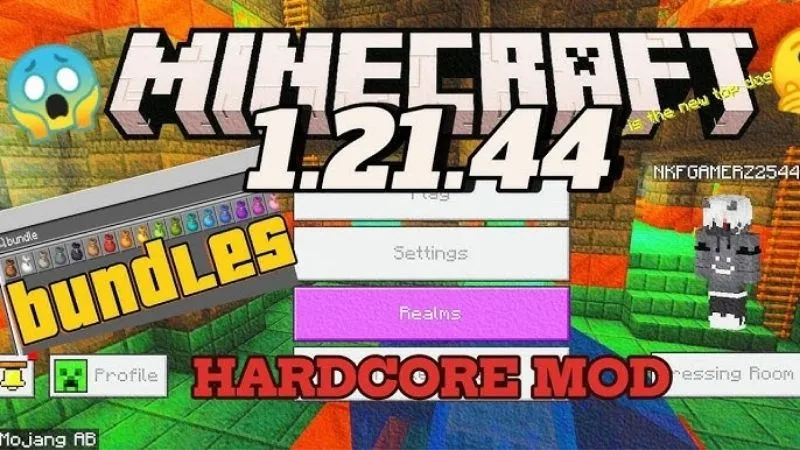
Bundles remain one of the most useful features of this release branch.
A Bundle allows different item types to share one inventory slot, helping players organize small stacks collected during mining, exploration, and building.
The Bundle recipe requires:
- 1 String
- 1 Leather
A Bundle can hold the equivalent of one normal stack and allows players to view and select stored items.
Hardcore Mode
Minecraft 1.21.44 also retains Hardcore Mode from Bedrock 1.21.40.
Hardcore worlds have several important rules:
- Difficulty is locked to Hard.
- Players only have one life.
- Hardcore Mode cannot be disabled after world creation.
- Death prevents normal respawning.
- Players can only continue viewing the world as spectators.
Because death is permanent, regularly backing up important Hardcore worlds is recommended.
Minecraft 1.21.44 vs Minecraft 1.21.40
The difference is simple:
| Version | Main Purpose |
| Minecraft 1.21.40 | Bundles of Bravery content update |
| Minecraft 1.21.44 | Skull and Realms hotfix |
Minecraft 1.21.40 introduced Bundles, Hardcore Mode, Android improvements, and more than 140 fixes.
Minecraft 1.21.44 does not add another major content set. It improves compatibility and stability within the same release branch.
Should You Install Minecraft 1.21.44?
Minecraft 1.21.44 is most useful if you:
- Need compatibility with this specific Bedrock version.
- Use older world templates containing Skull blocks.
- Experienced crashes when managing Realm members.
- Want the Bundles of Bravery experience on this hotfix build.
- Need version 1.21.44 for an older map, server, or addon.
If you do not specifically need this release, newer Bedrock versions contain additional updates and fixes.
Before Installing Minecraft 1.21.44 APK
Always protect important worlds before changing Minecraft versions.
Back Up Your Worlds
Before installation:
- Open Minecraft.
- Select Play.
- Find your important world.
- Open its settings.
- Choose Copy World.
This is particularly important when moving between older and newer versions.
Check Your Current Version
If you already have Minecraft installed, check the version shown on the main menu.
Downgrading from a newer version to 1.21.44 can cause world compatibility problems because newer worlds may contain data that an older build does not support.
How to Install Minecraft 1.21.44 APK on Android
Step 1: Check the File
Make sure you are installing the correct Bedrock version:
- Version: 1.21.44
- Package: com.mojang.minecraftpe
- Platform: Android
Step 2: Download the APK
Download the Minecraft 1.21.44 APK from a trusted source and wait until the file has completely downloaded.
Step 3: Allow APK Installation
Android may ask for permission to install apps from your browser or file manager.
Enable this permission only for the application you are using to open the APK.
Step 4: Install Minecraft
Open the APK file and select Install.
If your existing Minecraft installation has a compatible package and signature, Android may install it as an update.
Step 5: Verify the Version
Launch Minecraft and confirm that version 1.21.44 appears on the main screen.
Step 6: Test a Backup World
Open a copied world first and check:
- Inventory
- Skull blocks
- Resource packs
- Addons
- Redstone
- Realms
- Multiplayer
Only open an important main world after confirming that everything works correctly.
Minecraft 1.21.44 APK Not Installing
If Android shows App Not Installed, possible causes include:
- Different application signatures
- Insufficient storage
- Corrupted APK file
- Conflicting Minecraft installation
- Attempting to downgrade over a newer version
Do not uninstall your current Minecraft installation before backing up important worlds.
Looking for a Newer Minecraft Version?
Minecraft 1.21.44 is now an older Bedrock release.
Players looking for later content can explore Minecraft 1.21.130, which introduces the Mounts of Mayhem update with the Spear, Nautilus, Zombie Horse, and new mounted-combat features.
For a later stability-focused release, see Minecraft PE 1.21.132.
Conclusion
Minecraft 1.21.44 APK is a small but useful Bedrock hotfix rather than a major content release.
Its main purpose is to fix Skull variants being incorrectly converted in older world templates and prevent a Realms Stories crash after inviting players.
Bundles and Hardcore Mode remain available because they were introduced in Minecraft 1.21.40. If you specifically need the 1.21.44 release branch, back up your worlds before installation and avoid opening newer-version saves without a backup.
Frequently Asked Questions
When was Minecraft 1.21.44 released?
Minecraft Bedrock 1.21.44 was released on November 1, 2024.
What is new in Minecraft 1.21.44?
The update fixes an issue involving Skull blocks in older world templates and a crash when returning to Realms Stories after inviting another player.
Is Minecraft 1.21.44 a major update?
No. Minecraft 1.21.44 is a small Bedrock hotfix.
Does Minecraft 1.21.44 add new mobs?
No. Mojang did not introduce new mobs, blocks, biomes, weapons, or structures in this hotfix.
Does Minecraft 1.21.44 have Bundles?
Yes. Bundles remain available because they were introduced in Minecraft Bedrock 1.21.40.


